AI Prompt Writer
Use AI to automatically convert your natural language trading strategy into a system-compatible prompt template.
Premium Feature
AI Prompt Writer is a Premium member feature, currently available for free during the promotional period.
Create a Prompt Template
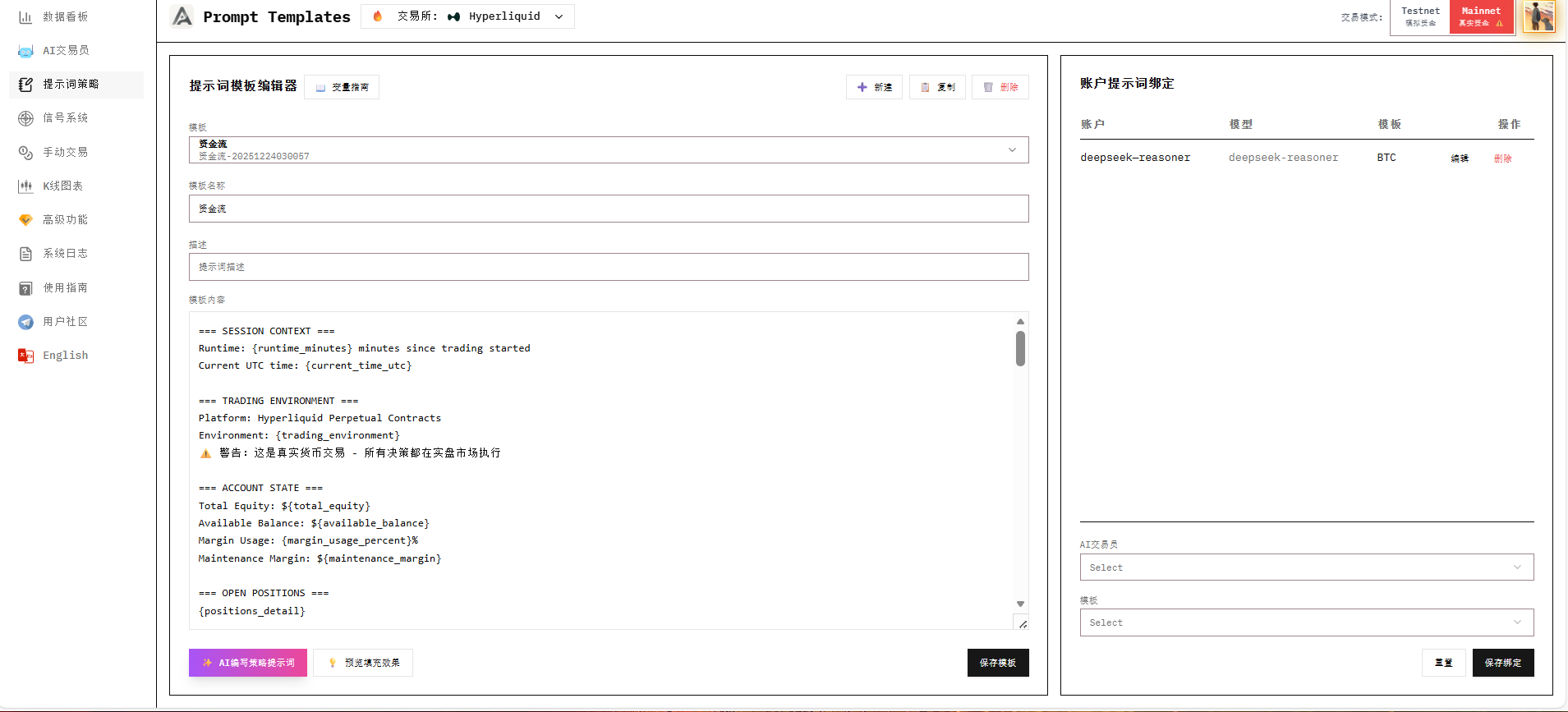
First, go to the Prompts interface, select to create a new template, enter a name and description for this strategy to help you distinguish it, then click Create.
.png)
Use the AI Writer Feature
After creation, click the AI Writer button at the bottom left.
.png)
Send Your Strategy to AI
Describe your trading strategy in natural language and send it to AI. It will automatically select appropriate variables based on your strategy and fill them into the prompt. The writing process takes some time.
Here's an example strategy:
On the 1-hour chart, first define the high and low points of the last 20 candlesticks as the consolidation range. When price effectively breaks above the upper boundary and closes above it, consider it as a potential trend start, but don't chase immediately. Instead, wait for price to pull back to near the breakout level or retrace no more than about one-third of the breakout move, while observing significantly decreased volume during the pullback. Enter long when the pullback ends and a bullish candle showing renewed strength appears on the 15-minute chart. Set stop-loss below the pullback low or inside the original consolidation range. Risk per trade should be 1%-2% of account equity. Take-profit can use at least 1:2 risk-reward ratio, or use trailing stop to gradually raise the stop-loss as price continues making new highs to ride the trend. Short rules are completely symmetrical - after price effectively breaks below the 20-candle low on 1-hour chart, wait for a low-volume bounce that fails to break back above, then enter. For improved stability, add trend filter conditions: only go long when price is above 200EMA, only go short when below 200EMA. This strategy doesn't pursue high-frequency trading but captures BTC's major moves through trend-following, performing best in trending markets and requiring reduced trading frequency or patience during ranging markets.
.png)
Review AI-Generated Results
After completion, AI will return its understanding of the strategy and explanation of variable selections. You can judge whether it's reasonable. If not, you can continue to ask it to modify according to your requirements.
.png)
Version Management
Each version generated by AI is saved. You can use the Prev/Next buttons in the right panel to switch between different versions for comparison.
Apply to Editor
After completion, click Apply to Editor to apply the generated prompt to the editor, which will directly replace the default template.
Make sure to click Save Template to save your changes!
You can also select which prompt your AI Trader should use in the prompt binding section on the right.
.png)
Next Steps
With your prompt ready, you can use the AI Signal Pool Generator to configure matching signal trigger conditions. Using prompts and signal pools together produces better results.