FAQ
This page collects common questions and solutions encountered while using Hyper Alpha Arena.
How to Get Testnet Funds?
When using Hyperliquid testnet mode for simulated trading, you need test funds to execute trades.
Binance Users
Binance Futures does not have a testnet mode in Hyper Alpha Arena. You trade directly with real funds. Start with small amounts and low leverage.
If you see this warning in the logs:
⚠️ Account skipped - No balance to trade! Equity: $0.00Please follow these steps to obtain free testnet funds.
Step 1: Mainnet Deposit
First, visit Hyperliquid Mainnet to log in and ensure your account has at least 5 USDC as margin.
If not, click Deposit to make a deposit.
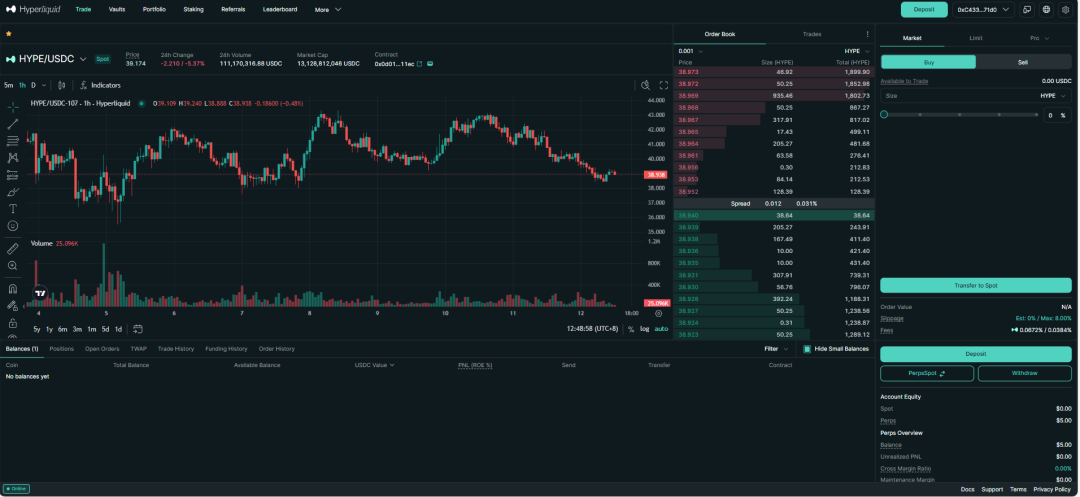
Step 2: Apply for Testnet Funds
Visit Hyperliquid Testnet Application Page.
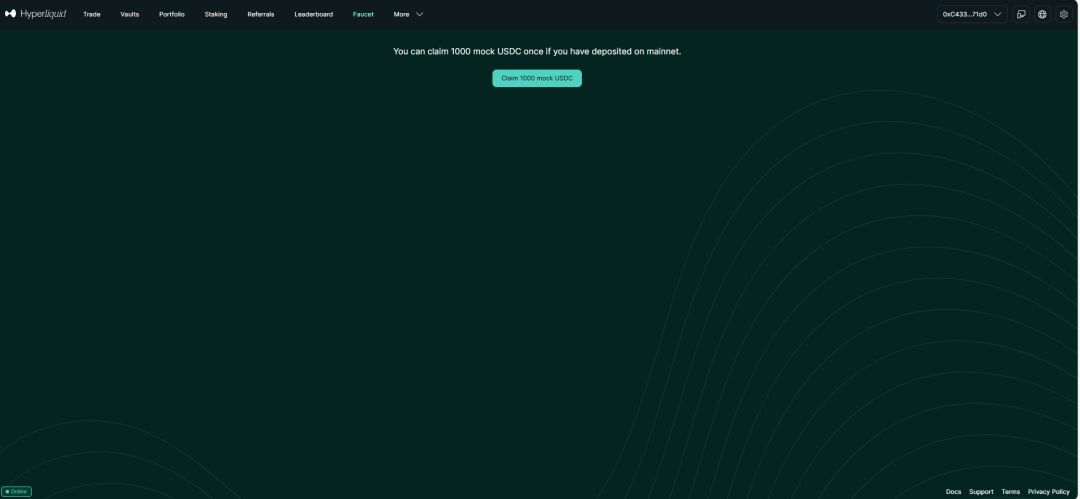
Click to claim simulated funds.
Step 3: Verify Balance
Return to the Hyper Alpha Arena interface and refresh the page. You should see the balance has been updated.
Wait for the next strategy trigger (60-150 seconds, depending on your interval settings) to fire, then check System Logs. You should see AI decision logs.
Note
Testnet funds are free virtual funds that can be claimed unlimited times, used for testing strategies without real fund risk.
Why Isn't the AI Strategy Executing Trades?
Check the following common issues in order:
1. Zero Balance
Check System Logs for "no balance to trade" warnings. If present, refer to the FAQ above to get testnet funds.
2. Strategy Not Enabled
Verify that "Strategy Status" in AI Trader settings has Enabled checked.
3. Trigger Interval
The default trigger interval is 150 seconds (2.5 minutes). Wait at least this long after enabling the strategy.
4. Auto Trading Disabled
Check if your account has the "auto trading" feature enabled.
5. API Key Issues
Verify that your AI model API key is valid and has sufficient credits/quota.
6. Exchange Account Not Connected
- Hyperliquid: Confirm wallet is connected and private key format is correct (requires
0xprefix) - Binance: Confirm API Key and Secret are correct, IP whitelist includes your server, and Futures permissions are enabled
7. Prompt Not Bound
Check if a strategy prompt has been bound to the AI Trader.
Troubleshooting Suggestion
It's recommended to troubleshoot in the order above. Most issues are caused by incomplete configuration.
What's the Difference Between Testnet and Mainnet?
Exchange Differences
- Hyperliquid supports both testnet and mainnet in Hyper Alpha Arena
- Binance Futures only supports live trading (no testnet mode in HAA)
Testnet Features (Hyperliquid Only)
- ✅ Uses test funds with no actual value
- ✅ Risk-free testing environment
- ✅ Real market mechanisms and order matching
- ✅ Can obtain unlimited test funds for free
- ✅ Perfect for testing strategies before going live
Mainnet Features
- ⚠️ Uses real cryptocurrency (USDC)
- ⚠️ Real money at risk - can lead to losses
- ⚠️ Live trading on Hyperliquid DEX or Binance Futures
- ⚠️ Requires depositing real funds into your wallet
- ⚠️ Should only be used after thorough testing on testnet
Important Warning
Test on testnet for at least 1 week before considering mainnet trading!
Mainnet trading involves real funds and can lead to significant losses. Please ensure:
- Fully understand strategy logic
- Verify strategy effectiveness on testnet
- Set reasonable risk control parameters
- Start with small amounts
- Continuously monitor trading performance
Other Common Questions
How to Switch Between Testnet and Mainnet?
At the top of the interface, you can see mode switching options:
- Testnet (Test Money): Testnet mode
- Mainnet (Real Money): Mainnet mode
After switching, you need to reconfigure the wallet for the corresponding network.
Note
This applies to Hyperliquid only. Binance accounts don't have testnet/mainnet switching in HAA.
Can I Run Multiple AI Traders Simultaneously?
Yes. You can create multiple AI Traders, each using different:
- AI models (GPT, Claude, Deepseek, etc.)
- Strategy prompts
- Trigger conditions
- Wallet addresses
How to Backup My Configuration?
It's recommended to regularly:
- Export strategy prompts (copy and save)
- Record AI Trader configuration parameters
- Save signal pool settings
- Backup wallet private keys (secure storage)
How to Report a BUG?
- Find error information in System Logs
- Screenshot and save error logs
- Visit GitHub Issues
- Submit detailed problem description and error logs
How to Get Help?
- Check other sections of this documentation
- Join Discord Server
- Follow Developer Twitter
- Visit GitHub Repository
Return to Learning Path
If you've been following the learning path and reached here, congratulations on completing all basic content!
Now you can:
- Return to Getting Started to view the complete learning path
- Dive deeper into functional modules of interest
- Practice your strategies on testnet
- Join the community to exchange with other users